Cloud apps, VoIP, video meetings – these technologies have become the backbone of the modern enterprise. Virtual meetings replace in-person ones. ERP systems run entirely in the cloud. Sales teams make calls via softphone rather than desk handsets.
And yet, a familiar paradox persists: IT upgrades the connection to 1 Gbps, and employees still complain that Zoom stutters, Teams drops out, and accounting software takes forever to load. Speedtest.net shows everything in the green – but the actual experience tells a very different story.
The answer is rarely “buy more bandwidth.” This two-part series breaks down the five most common root causes of enterprise network instability. This Part 1 covers the invisible infrastructure-level causes – congestion, ISP limitations, and the little-known phenomenon of bufferbloat.
💡 Central Argument
High throughput (Mbps) and a stable network experience (low latency + low jitter) are two DIFFERENT metrics. Most businesses only measure the first – but the real problems live in the second.

1 – The Root Causes of Slowness and Instability
1.1 – Internal Congestion & Device Limits
The majority of enterprise network problems don’t originate at the ISP – they originate inside the office itself. When traffic volume grows but network hardware (routers, switches, firewalls) isn’t upgraded to match, bottlenecks form well before traffic even reaches the internet.
Common internal causes include:
• Overloaded network devices: Entry-level routers and switches get overwhelmed when handling simultaneous traffic from cloud apps, backups, and video calls.
• Hardware limitations: A NIC supporting only 100 Mbps, or an aging switch capped at Fast Ethernet, creates a hard ceiling – even if the ISP line is Gigabit fiber.
• Missing QoS (Quality of Service): Without traffic prioritization, a background file backup competes equally with a live video call – and often wins, to everyone’s frustration.
• Broadcast storms & ARP flooding: Misconfigured VLANs or faulty switches can create traffic loops that effectively paralyze the entire network.
1.2 – ISP Bandwidth Sharing & Peak-Time Slowdowns
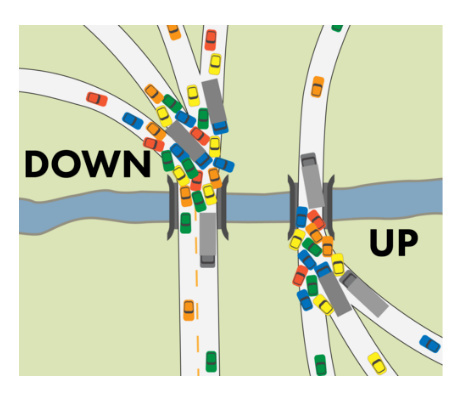
Even with a perfectly configured internal network, problems can still come from the ISP side. This is a reality many businesses don’t fully understand when signing a contract:
Contention ratio: “Best effort” broadband packages share physical infrastructure among many customers. During peak hours (9–11am, 1–3pm), real-world speeds can drop to 20–30% of the advertised rate.
Leased line vs. standard broadband: A dedicated leased line guarantees consistent speeds 24/7 with no sharing. Standard broadband offers no such guarantee – regardless of how attractive the headline speed looks.
SLA (Service Level Agreement): Many businesses operate without a clear SLA covering uptime and latency thresholds. When issues arise, there’s no contractual mechanism to compel the ISP to respond quickly.
📌 Practical Tip
Before escalating to your ISP, measure latency and jitter – not just download speed. Tools like iPerf3, PRTG Network Monitor, or Speedtest CLI give a far more complete picture than a standard speedtest.
2. Bufferbloat: The Silent Enemy of Low Latency
This is the least-discussed cause of network problems – yet it directly impacts VoIP, video conferencing, and every real-time application your business depends on.
What Is Bufferbloat?
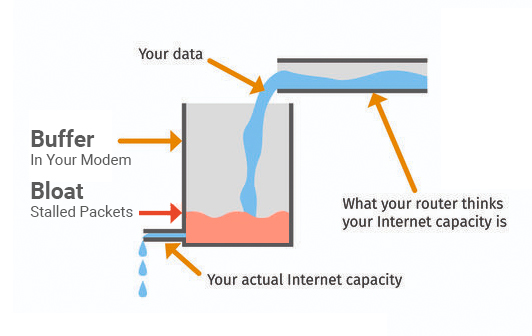
Bufferbloat is a phenomenon that occurs when routers or switches are configured with excessively large buffers. Instead of dropping packets when congestion occurs (which would let TCP self-regulate), the network device holds a massive queue – and packets must wait in line before being transmitted.
The result: The connection appears healthy on the surface (throughput remains high), but each packet spends hundreds of extra milliseconds sitting in the queue. Latency spikes. Jitter follows. Real-time applications suffer.
Why Does This Cause Serious Problems?
Consider this scenario: An employee starts uploading a 5GB backup to cloud storage. At the same moment, their manager begins a video call with a client. If the router has a large buffer and no QoS, thousands of backup packets fill the queue. RTP packets from the video call stack up behind them – leading to stuttering, freezing, and broken audio.
The troubling part: A standard speedtest will still show full bandwidth. You cannot detect bufferbloat without measuring latency under real load.
Bufferbloat Especially Impacts:
✓ VoIP & softphones: Require latency below 150ms and jitter below 30ms. Bufferbloat can push latency to 300–500ms.
✓ Video conferencing (Zoom, Teams, Meet): Frozen frames, audio delay, lost focus in meetings.
✓ Trading platforms & fintech: Order execution delays, slow market data feeds.
✓ Remote desktop (RDP/VPN): Noticeable lag on keystrokes and mouse movement.
👉 Coming Up in Part 2
We’ll cover the two remaining root causes: Wi-Fi and office infrastructure failures (the #1 source of problems in most offices), and the silent configuration and security mistakes that degrade network performance without anyone noticing – plus a full action checklist.